
Small manufacturers
Production labels for Small Manufacturers
Batch-print product, batch and carton labels straight from your spreadsheets. Professional output without desktop label software, print servers or an IT project. One saved layout serves every new run.
7 days free · No credit card
From spreadsheet to the shop floor
You outgrew handwritten and Word-template labels, but a full desktop suite may be more than you need. In Cloudlabels you import the run from Excel or CSV, design the label once and export one PDF. The next run uses the same layout with a new file.
What you will print
Product ID labels
Part numbers, descriptions and a barcode on every unit, generated from your item data.
Batch and lot labels
Lot numbers and production dates, printed per run from the spreadsheet.
Carton and case labels
Quantities, SKUs and EAN-13 or UPC on the outer pack.
Bin, shelf and internal tracking labels
Code 128 or DataMatrix labels for locations and work in progress, from the same type of spreadsheet.
How it works
Import the run
Drop in the Excel or CSV file for the production run. Match the columns to your fields, and each row becomes one label.
Design the label once
Place text and a code, and link them to your columns. Use Code 128 or DataMatrix on the shop floor, and EAN-13 or UPC on sellable units.
Export and print
Export one PDF for the run and print it with the printers you already have. Update the sheet and print again for the next run. On a label printer attached to a Windows PC, Print Station can send the job without the browser print dialog.
From a row to a label
| Ingredients | Net weight | Best before | Batch | EAN-13 |
|---|---|---|---|---|
| Plums (48%), onion, cider vinegar, brown sugar, raisins, fresh ginger (3%), salt, cinnamon | 210 g | 31/08/2027 | L2617 | 2026110001131 |

More labels made the same way
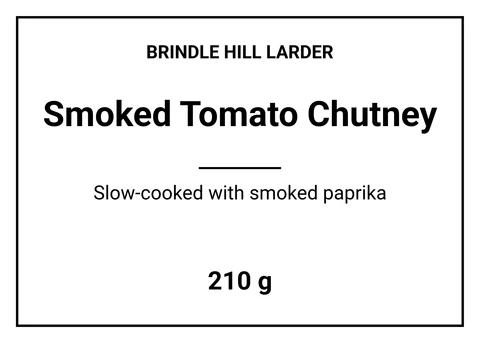
Jar Front Label · 70 × 50 mm
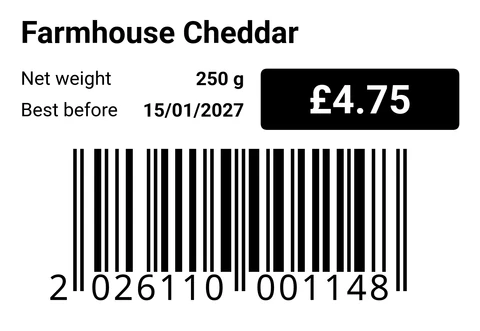
Pack Price Label · 58 × 40 mm · EAN-13
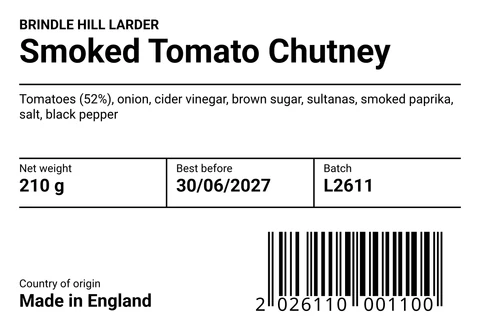
Food Product Label · 100 × 70 mm · EAN-13
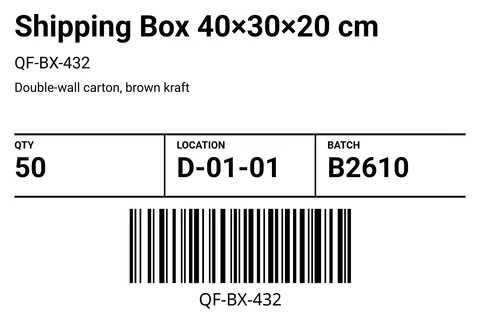
Stock Label · 100 × 70 mm · Code 128


Cloudlabels for small production teams
- Spreadsheet to PDFImport Excel or CSV, or type rows in the item table. The label reads from the same rows.
- Shop floor and retail codesEleven barcode types plus QR codes. Code 128 and DataMatrix for internal use, EAN-13 and UPC for retail cartons.
- Avery and HERMA sheetsPick a sheet from the list, or set your own grid on Pro and Business.
- Saved layoutsSave the design as a print profile and reuse it for the next production run, with a new spreadsheet.
- Print StationSend labels to a label printer on a Windows PC without the browser print dialog.
- No print serverCloudlabels runs in the browser. Nothing to install on the shop PCs.
- Print quality600 DPI PDF on Pro and Business. The Free plan exports at 300 DPI with a small watermark.
Questions
Still unsure? Contact us
Is Cloudlabels a BarTender alternative for small manufacturers?
Cloudlabels is browser-based label software. You import Excel or CSV, design the label and export a print-ready PDF, without installing a desktop suite or running a print server. See Cloudlabels vs BarTender for a side-by-side comparison.
Can we print production labels in batch from a spreadsheet?
Yes. Import Excel or CSV, link the columns to the label and export one PDF. Update the sheet and print again when the next run changes.
Do we need IT or a print server?
No. Cloudlabels runs in the browser. You export a PDF and print it with your existing printers, or use Print Station on a Windows PC.
Which barcodes work on the shop floor and for retail?
EAN-13, UPC-A, UPC-E, EAN-8, Code 128, GS1-128, ITF-14, Code 39, DataMatrix, GS1 DataMatrix and PDF417, plus QR codes. Choose Code 128 or DataMatrix for internal use, and EAN-13 or UPC for retail units.
Can we use Avery or HERMA label sheets?
Yes. Choose a sheet from the list so each label lands on the correct position. On Pro and Business you can also set up your own sheet size.
Is there a free plan for small shops?
The Free plan includes 20 items and 200 labels per month, with a small watermark. Pro gives you up to 25,000 items and unlimited labels, and Business up to 250,000 items and up to 10 team members. Pro and Business both start with a 7-day trial, no credit card.
What happens when the Pro trial ends?
The trial gives you Pro for 7 days with no credit card. When the trial ends, add a payment method to keep using Pro.
Your next run, from the same layout
GS1® and EAN are registered trademarks of GS1 AISBL. Avery, HERMA, BarTender, Excel, Windows and other names are trademarks of their respective owners. They are used only to identify standards, products and compatible formats. Cloudlabels is not affiliated with, endorsed by or certified by GS1 or any other company named on this page.