Cloudlabels - Professional Barcode Label Creation Software
Solution sheet · QR codesSheet 02 / 05

Professional QR Code Labels in minutes

Generate QR code labels for products, inventory, and marketing. Bulk creation from your data — every label gets its own unique, scannable code.
Multi-column data4 error correction levelsCustom colorsFree tier for evaluation
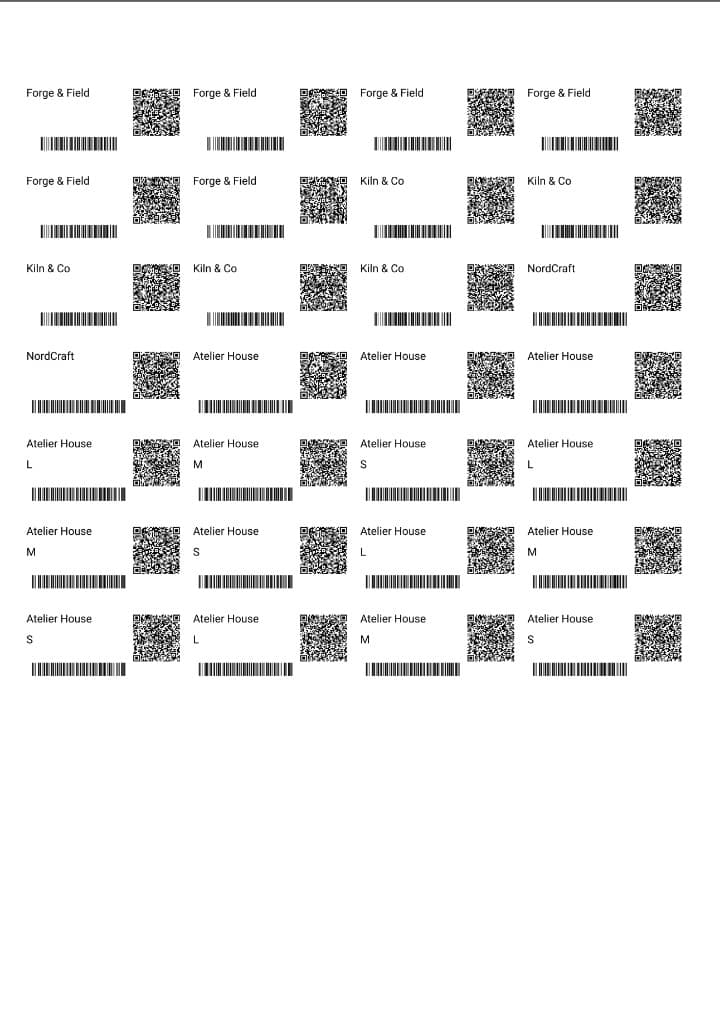
Exported A4 label sheet with QR codes and barcodes aligned to the label grid
ProofExported A4 sheet · QR + barcodesAligned to the die-cut
Use case index

QR codes for every purpose

01 / Formats
№ 01

Website URLs

Link products to landing pages, product info pages, or your online store.

№ 02

Product Information

Link to specifications, manuals, or assembly instructions.

№ 03

Asset & Inventory IDs

Encode tool IDs and item numbers so a phone scan jumps straight to the right record.

№ 04

Digital Business Cards

Encode contact information (vCard) for easy saving to phones.

№ 05

Authentication

Create unique QR codes for product authenticity verification.

№ 06

Sustainability Info

Link to recycling instructions or sustainability certifications.

Job ticket

How it works

02 / Process
Step01

Import your data

Bring in products, assets, or URLs from Excel, CSV, or Shopify. Combine multiple columns — name, SKU, URL — into the content of a single QR code per row.

.xlsx / .csvShopify syncMulti-column encoding
Step02

Design the label once

Drag a QR element onto the canvas, bind it to your data, and pick an error correction level. Add text, logos, and even a 1D barcode next to it on the same label.

Drag & dropL / M / Q / H correctionCustom colors
Step03

Print unique codes in bulk

Every row gets its own QR code. Export a 600 DPI print-ready PDF onto Avery or HERMA sheets or custom sizes — codes stay scannable from tiny labels to signage.

600 DPI PDFAvery + HERMAUnique per row
Spec sheet

What the QR engine does

03 / Specs
01

Multi-column QR codes

Combine multiple data fields into a single QR code — product name, SKU, and URL together.

02

4 error correction levels

Choose L (7%), M (15%), Q (25%), or H (30%) recovery so codes scan even with partial damage.

03

Dynamic data encoding

Link QR content to database columns. Each label generates a unique code from your data.

04

Custom colors

Match QR codes to your brand — the live preview keeps contrast high enough to stay scannable.

05

Scalable vector output

QR codes render at any size without quality loss, from tiny product labels to large signage.

06

Bulk generation

Generate thousands of unique QR code labels from Excel or CSV data in one run.

Margin notes

Frequently asked questions

04 / FAQ
Cloudlabels QR codes can encode any text data including URLs, product information, contact details (vCard), email addresses, phone numbers, or custom data. You can combine multiple data columns into a single QR code.
Yes! Import your product data via CSV and link QR code content to data columns. Each label automatically generates a unique QR code with that product's specific information.
Error correction allows QR codes to remain scannable even when partially damaged. Cloudlabels supports 4 levels: L (7% recovery), M (15%), Q (25%), and H (30%). Higher levels create larger QR codes but survive more damage.
Yes! Change foreground and background colors to match your brand. Our preview ensures the QR code remains scannable with your chosen colors. High contrast is recommended for reliability.
In the Design Center, drag a QR code element onto your label. Select your data source (static text or database column), choose error correction level, and position/resize as needed. Preview updates in real-time.
Minimum recommended size is 2cm x 2cm (0.8") for close-range scanning. For scanning at distance, increase size proportionally. Our 600 DPI export ensures crisp output at any reasonable size.
Absolutely! Add both barcode and QR code elements to a single label. Many users include EAN-13 for retail scanning plus a QR code linking to additional product information.
Cloudlabels creates static QR codes with the data encoded directly. For trackable/editable "dynamic" QR codes, you would need to encode a URL pointing to a redirect service you manage.

Related pages

Start creating QR code labels today

Unique, scannable QR codes for every product, asset, or bin — generated from your data in one run.

Free tier for evaluation · 7-day Pro trial, no credit card