Cloudlabels - Professional Barcode Label Creation Software
Solution sheet · InventorySheet 03 / 05

Professional Inventory Labels for your business

Create warehouse labels, asset tags, and stock labels with barcodes. Manage thousands of items in a built-in, Excel-like item table and print from it directly.
Excel-like item table8 barcode typesShopify syncFree tier for evaluation
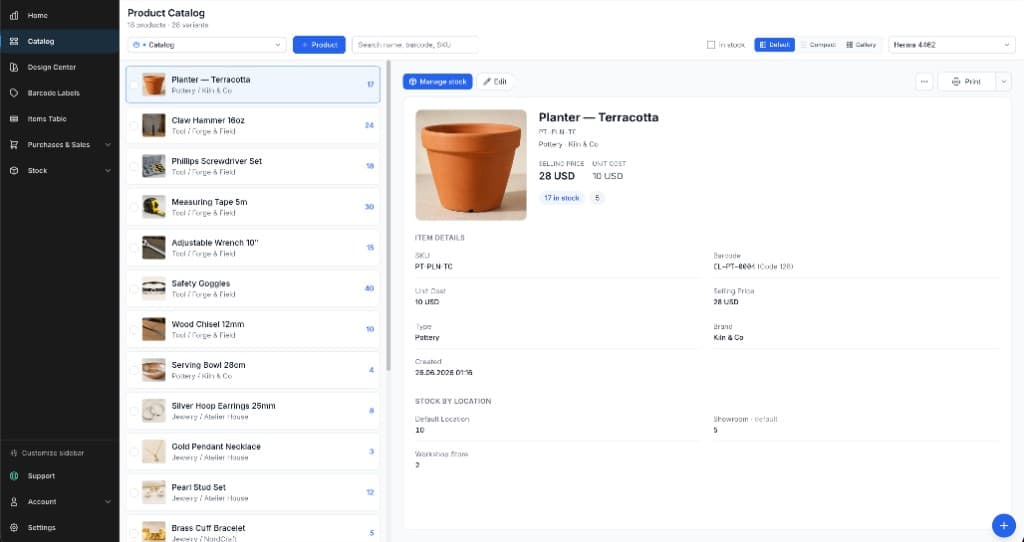
Cloudlabels product catalog with a product card showing price, SKU, barcode, and stock by location
ProofProduct catalog · stock by locationPrint from the card
Print queue

Inventory labels you can create

01 / Formats
№ 01

Warehouse Labels

Bin labels, shelf labels, and location markers for efficient warehouse navigation and picking.

№ 02

Asset Tags

Durable asset labels with barcodes for tracking equipment, furniture, and company property.

№ 03

Stock Labels

Product labels with SKU, quantity, and reorder information for inventory management.

№ 04

Tracking Labels

Scannable labels with unique identifiers for item-level inventory tracking.

№ 05

Batch Labels

Batch and lot number labels for manufacturing and quality control traceability.

№ 06

Date Labels

Expiry dates, received dates, and rotation labels for perishable inventory.

Job ticket

How it works

02 / Process
Step01

Load your inventory

Import Excel files directly — no CSV conversion needed — sync from Shopify, or paste rows straight into the item table. Add custom columns for location, supplier, category, anything.

.xlsx / .csvShopify syncCustom fields
Step02

Design the label once

Bind text and barcode elements to your columns. CODE-128 for internal tracking, EAN-13/UPC for retail stock, DataMatrix where space is tight.

Data binding8 barcode typesLive preview
Step03

Filter, select, print

Use the item table like a spreadsheet: filter by any column, select the rows you need, and print just those labels as a 600 DPI PDF on Avery or HERMA sheets.

600 DPI PDFAvery + HERMAPrint selected rows
Spec sheet

What the item table does

03 / Specs
01

Excel-like item table

Manage thousands of inventory items with keyboard navigation, bulk editing, and filtering.

02

Barcode generation

8 barcode types — CODE-128 for internal tracking, EAN-13/UPC for retail inventory.

03

Excel & CSV import/export

Import from Excel with smart field mapping, export back out for other systems.

04

Custom fields

Add columns for any data: location, category, supplier, purchase date — all printable on labels.

05

Shopify integration

Sync products and variants from Shopify directly into your label system.

06

Avery & HERMA templates

Pre-configured sheet templates print with perfect alignment on the label stock you already use.

Margin notes

Frequently asked questions

04 / FAQ
Cloudlabels supports all inventory label types including warehouse location labels, asset tags, stock labels, tracking labels, batch/lot labels, and date labels. Add barcodes, QR codes, text, and images to any design.
Yes! Import Excel files (.xlsx) directly — no need to convert to CSV first. Our smart import automatically maps columns. You can also import CSV files or copy-paste directly into our item table.
Free plan: 20 items with 20 labels/month (watermarked). Starter Pack ($19 one-time): 2,000 labels over 90 days. Pro plan: up to 25,000 items with unlimited labels. Business plan: up to 250,000 items with unlimited labels and up to 10 team members. Enterprise: custom volumes — contact sales. All plans include the full-featured item table with bulk editing and filtering.
Yes! Add custom columns for any data you need: location codes, categories, suppliers, purchase dates, serial numbers, and more. All custom fields can be printed on labels.
CODE-128 is most popular for internal inventory due to alphanumeric support. For retail inventory, use EAN-13 or UPC-A. For small items, consider DataMatrix 2D codes.
Yes! Add a "Location" column to your inventory and include it on labels. When you move items, update the location in the item table. Print new labels as needed.
Yes! Connect your Shopify store to import products and variants. Sync inventory automatically and generate labels for all your products.
Absolutely! Select specific items in the item table, filter by any column, or use search. Then print labels for just the selected items.

Related pages

Get your inventory labeled and scannable

One item table, one label template, and every item in stock gets a consistent, scannable label.

Free tier for evaluation · 7-day Pro trial, no credit card