Cloudlabels - Professional Barcode Label Creation Software
Solution sheet · BarcodesSheet 01 / 05

Professional Barcode Labels made easy

Generate EAN-13, UPC, CODE-128, DataMatrix and more barcode labels from your product data. Bulk printing for retail, logistics, and inventory.

8 barcode types600 DPI exportExcel / CSV / ShopifyFree tier for evaluation
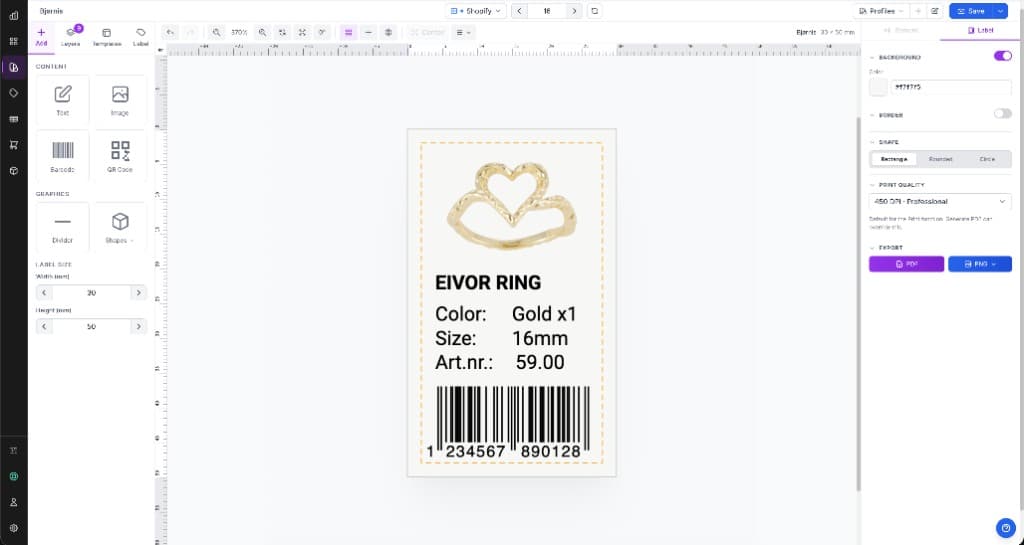
Cloudlabels Design Center with a product label on the canvas — text fields and EAN-13 barcode
ProofDesign Center · EAN-13 label600 DPI · PDF export
Symbology index

8 barcode types for every use case

01 / Formats
EAN-13

EAN-13 Barcodes

Standard 13-digit European Article Number for retail products worldwide. Used in Europe, Asia, and globally.

Use: Retail products, grocery, books (ISBN)

UPC-A

UPC-A Barcodes

12-digit Universal Product Code standard for North American retail. Required for selling in US and Canada.

Use: US/Canada retail, Amazon FBA, grocery

CODE-128

CODE-128 Barcodes

High-density alphanumeric barcode supporting all 128 ASCII characters. Industry standard for logistics.

Use: Shipping, logistics, GS1-128, internal tracking

CODE 39

Code 39 Barcodes

Alphanumeric barcode widely used in non-retail applications. Self-checking, no checksum required.

Use: Automotive, defense, healthcare, assets

DATAMATRIX

DataMatrix Codes

2D barcode storing up to 2,335 characters in a small space. Error correction for damaged labels.

Use: Electronics, pharma, aerospace, small parts

GS1 DM

GS1 DataMatrix

DataMatrix with GS1 Application Identifiers for supply chain traceability and compliance.

Use: Healthcare, pharmaceutical, food traceability

EAN-8

EAN-8 Barcodes

Compact 8-digit version for small products where EAN-13 won't fit. Same GS1 standard.

Use: Small retail items, cosmetics, candy

UPC-E

UPC-E Barcodes

6-digit compressed version of UPC-A for small packages. Zero-suppressed format.

Use: Small packages, coupons, magazines

Job ticket

How it works

02 / Process
Step01

Bring in your product data

Import Excel or CSV files, sync your Shopify catalog, or type items straight into the built-in item table. SKUs, names, prices, and barcode numbers land as columns you can edit in place.

.xlsx / .csvShopify syncAuto field-mapping
Step02

Bind a barcode to your data

Drag a barcode element onto the label, pick the symbology, and link it to a data column. Each label generates the correct, scannable barcode for its row — no copy-paste, no typos.

Drag & dropData bindingLive preview
Step03

Batch-print the run

Select your items, choose an Avery or HERMA sheet code or a custom size, and export one 600 DPI print-ready PDF. Every barcode is crisp and scannable on laser, inkjet, or thermal printers.

600 DPI PDFAvery + HERMABatch × 1000s
Spec sheet

What the barcode engine does

03 / Specs
01

Dynamic barcode data

Link barcodes to database columns — each label automatically generates the correct barcode from your data.

02

Barcode Design Center

Fine-tune module width, bar height, text size, colors, and quiet zones with a real-time preview.

03

Scannable output, verified

600 DPI PDF exports keep bars crisp on any printer. The barcode engine is built for scan reliability.

04

Bulk generation

Import product data via Excel or CSV and generate thousands of barcode labels in one run.

05

GS1 support

GS1-128 via CODE-128 and GS1 DataMatrix for supply chain, logistics, and healthcare compliance.

06

Mix with QR and text

Combine barcodes, QR codes, text, and images on one label — e.g. EAN-13 for the till plus a QR link.

Margin notes

Frequently asked questions

04 / FAQ
Cloudlabels supports 8 barcode types: EAN-13, UPC-A, CODE-128, Code 39, EAN-8, UPC-E, DataMatrix, and GS1 DataMatrix. This covers all major retail (EAN/UPC), logistics (CODE-128), and 2D (DataMatrix) requirements.
Yes! Import your product data directly from Excel (.xlsx) or CSV files and link barcode fields to your data columns. Each label automatically generates the correct barcode for each product.
For retail: Use EAN-13 for international markets, UPC-A for US/Canada. For small items, use EAN-8 or UPC-E. For logistics and shipping, use CODE-128. For small parts or healthcare, use DataMatrix.
Yes! Our Barcode Design Center lets you customize module width (bar thickness), bar height, text size, font, colors, quiet zones (margins), and more. Preview changes in real-time before exporting.
Absolutely! Cloudlabels exports high-resolution 600 DPI PDFs that produce crisp, scannable barcodes on any quality printer. Our barcode engine is designed for scan reliability.
Yes! We support GS1-128 (via CODE-128) and GS1 DataMatrix. These are industry-standard formats for supply chain, logistics, and healthcare applications.
Yes! Simply drag a barcode element onto your label in the Design Center, select your barcode type, and link it to a data column or enter static data. Position and resize as needed.
Generate as many labels as your plan allows: Free (20 items, 20 labels/month, watermarked), Starter Pack (2,000 labels over 90 days for $19), Pro (up to 25,000 items with unlimited labels), Business (up to 250,000 items with unlimited labels), Enterprise (custom volumes). Export everything to a single print-ready PDF.

Related pages

Start creating barcode labels today

From product data to scannable, print-ready barcodes in minutes — no desktop software required.

Free tier for evaluation · 7-day Pro trial, no credit card